
- Networks
- Fibre routers
INTERNET-AZUL-INTERMITENTE
Movistar INTERNET-AZUL-INTERMITENTE on HGU router: connecting
Risk level
Low
Usually safe to check without specialist tools.
Urgency
Medium
Quick answer
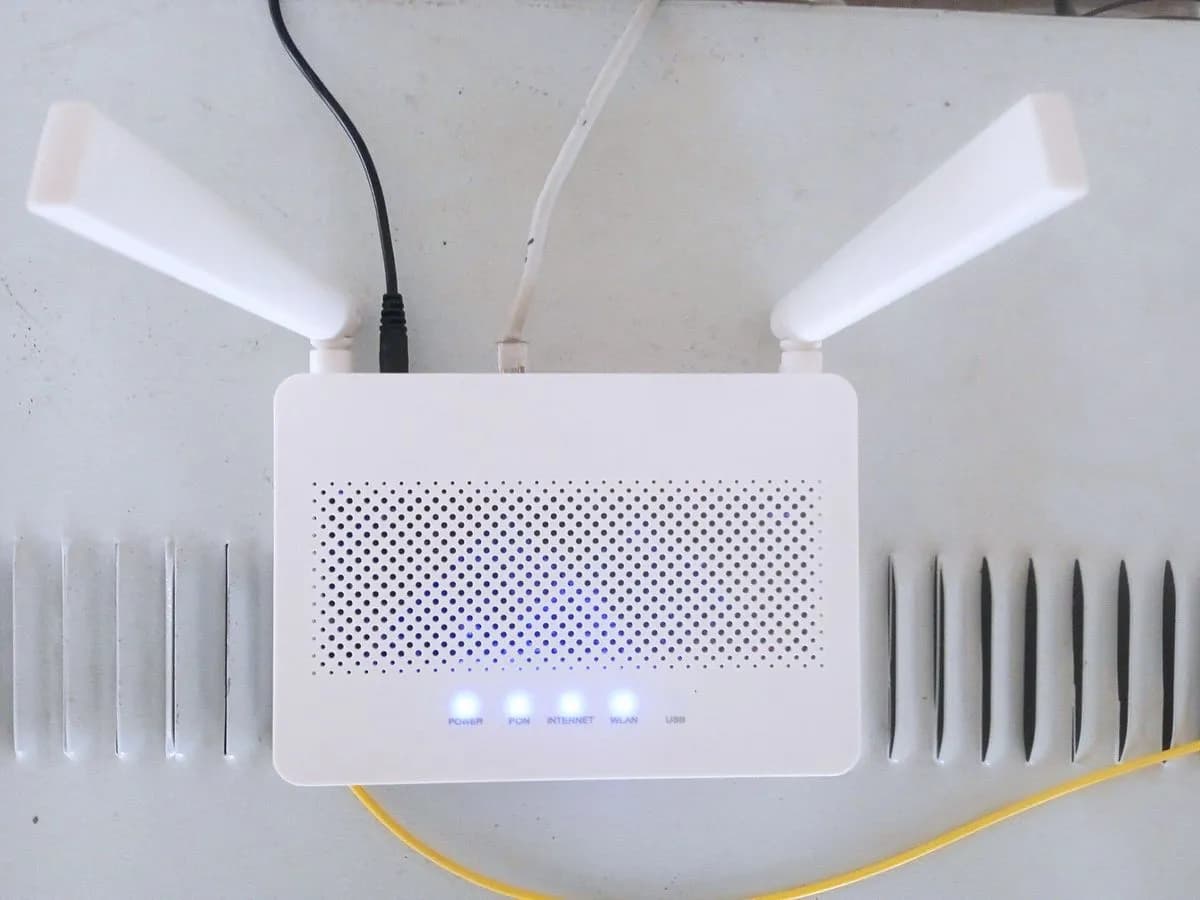
On a Movistar router, a blinking blue Internet light means the unit is establishing a connection with the Movistar network; wait a few minutes after boot, check cables, restart if it stays blinking and contact support if needed.
Safety first
Stop and check this first
- Movistar advises against handling the fibre-optic cable unnecessarily; never look into the fibre connector or open the router casing.
- Do not confuse a blinking blue Internet icon with the middle WiFi and WiFi Plus lights, which blink blue for about 120 seconds when WPS is pressed.
Safe checks you can perform
- Locate the Internet icon and wait after startup
- Compare with the telephony and Wi-Fi lights
- Check power and Ethernet cables without stressing the fibre
- Switch the router off for a few seconds and back on
Leave these tasks to a qualified professional
- Do not attempt this professional task: Remote line check with Movistar technical support
- Do not attempt this professional task: On-site visit by a Movistar technician
What a technician must be able to justify
Technician visit
These are the steps they must carry out and show you. Tick them as they work: if steps are skipped, do not accept a part swap.
These are not instructions for opening or handling the equipment yourself. They are the checks that should support a technical conclusion.
Remote line check with Movistar technical support
What they doMovistar support checks from their system why your HGU router stays stuck establishing the network connection instead of reaching a solid blue Internet LED.
They must show youthe line synchronisation and registration status of your router in their remote test.
In writingthe incident ticket number, the network diagnosis and the actions applied.
On-site visit by a Movistar technician
What they doIf remote testing points to a fibre signal problem or a router fault, a Movistar technician inspects the optical patch cord, wall socket and HGU at home.
They must show youthe fibre signal check result and all four router LEDs lit in solid blue.
In writingthe visit report stating the root cause and whether the router or fibre lead was replaced.
Before accepting a part or repair
Nothing has been shown yet. Do not accept a part swap based on the code alone.
Follow these steps
Note: Follow the documented order. An error code identifies the affected system, but it does not prove by itself which part has failed.
Locate the Internet icon and wait after startup
- Who:
- you.
- How:
- find the fourth front LED (the mouse icon) and, if the router was just turned on or rebooted, give it a few minutes without unplugging it to see whether blinking blue turns solid blue.
- Result that matters:
- verifying whether the router is simply completing its normal startup sequence.
- If the LED turns solid blue:
- Internet access is active and ready.
- If it keeps blinking blue for a long time or turns red:
- move to the next check.
- Evidence to keep:
- short video of the front panel showing all four LED indicators.
Evidence: Qué significan las luces LED del router Movistar · ¿Qué significan todas las luces de tu Router Movistar?
Compare with the telephony and Wi-Fi lights
- Who:
- you.
- How:
- check the other three lights on the Movistar router: telephony on the left (which also blinks blue while connecting) and the two middle WiFi (2.4 GHz) and WiFi Plus (5 GHz) lights.
- Result that matters:
- telling a full router startup apart from an isolated Internet connection issue.
- If all four lights settle on solid blue:
- both landline telephony and Internet are working.
- If the Internet light turns blinking red or solid red:
- there is a fibre signal or network registration fault.
- Evidence to keep:
- photo of the front panel clearly showing all four icons and their colours.
Evidence: Qué significan las luces LED del router Movistar · ¿Qué significan todas las luces de tu Router Movistar?
Check power and Ethernet cables without stressing the fibre
- Who:
- you.
- How:
- make sure the power cord and Ethernet cables are firmly plugged in; Movistar advises not handling the optical fibre cable too much so it does not bend or break.
- Result that matters:
- ruling out a loose power or local network plug during connection setup.
- If a loose plug was reseated and the light turns solid blue:
- test browsing again.
- If cables are secure and the light still does not turn solid blue:
- proceed to a power cycle.
- Evidence to keep:
- photo of the rear cable connections without opening anything.
Evidence: Qué significan las luces LED del router Movistar · Mi router Movistar no funciona. Soluciones a posibles problemas
Switch the router off for a few seconds and back on
- Who:
- you.
- How:
- turn the Movistar router off, wait a few seconds and switch it back on to restart all processes, then check its status in the Smart WiFi app.
- Result that matters:
- triggering a clean connection attempt with the Movistar network.
- If after booting the Internet LED stays solid blue:
- confirm Internet access on your devices.
- If it remains stuck blinking blue or turns red:
- contact Movistar customer support.
- Evidence to keep:
- time of the reboot and a screenshot from the Smart WiFi app.
Evidence: Qué significan las luces LED del router Movistar · Mi router Movistar no funciona. Soluciones a posibles problemas
Still not solved
If the error persists, stop here. See what the technician must do and show you.
Where this code applies
A code is meaningful only inside the right product and version context.
Primary scope
- System
- Networks
- Brand
- Movistar
- Product type
- Fibre routers
Known code variants
- hgu movistar led raton azul intermitente
- luz internet azul parpadeante movistar
- Movistar HGU flashing blue internet LED
- Movistar router internet light blinking blue
- Movistar router mouse icon blinking blue
- Movistar Smart WiFi blue internet light flashing
- movistar smart wifi internet azul parpadeando
- router movistar estableciendo conexion azul
- router movistar luz internet parpadea en azul
What it means
In Movistar's official LED guide (in Spanish, covering Smart WiFi HGU units and the WiFi 7 router, while other models may differ), the rightmost Internet icon (shaped like a two-button mouse) blinks blue while the router is accessing and establishing a connection with the Movistar network. This is normal when switching on or restarting the device, should not last long, and turns solid blue once Internet access is ready. The light alone never proves a hardware component is faulty.
Warnings and stop conditions
- Loweditorial warning
Movistar advises against handling the fibre-optic cable unnecessarily; never look into the fibre connector or open the router casing.
Evidence: Mi router Movistar no funciona. Soluciones a posibles problemas
- Loweditorial warning
Do not confuse a blinking blue Internet icon with the middle WiFi and WiFi Plus lights, which blink blue for about 120 seconds when WPS is pressed.
Evidence: Qué significan las luces LED del router Movistar · ¿Qué significan todas las luces de tu Router Movistar?
Symptoms and causes
Probable causes · in order
- Router recently switched on or restartedCommon
Movistar states that blinking blue normally appears right after the router is powered on, unplugged or restarted while it negotiates network access.
Evidence: Qué significan las luces LED del router Movistar · ¿Qué significan todas las luces de tu Router Movistar?
- Reconnecting after a brief network dropPossible
Following a short line interruption or local outage, the router automatically tries to re-establish its session with the Movistar network before turning solid blue.
Evidence: Qué significan las luces LED del router Movistar · Mi router Movistar no funciona. Soluciones a posibles problemas
- Network session failing to completePossible
If the blue blinking continues for a long time without turning solid blue, the connection handshake is stuck and requires a restart or a check by Movistar.
Evidence: ¿Qué significan todas las luces de tu Router Movistar? · Mi router Movistar no funciona. Soluciones a posibles problemas
Virtual technician
Does INTERNET-AZUL-INTERMITENTE still appear after these checks?
Answer a few questions to narrow down the likely cause and the safest next action. Guidance only - it never replaces a professional.
Sources and technical references
- 1
Qué significan las luces LED del router Movistar
Telefónica (Movistar) · 2026 · official_doc
- 2
¿Qué significan todas las luces de tu Router Movistar?
Telefónica (Movistar) · 2023 · official_doc
- 3
Mi router Movistar no funciona. Soluciones a posibles problemas
Telefónica (Movistar) · 2026 · official_doc
Was this entry useful?