
- TVs
- TV set-top boxes
Luz verde del frontal
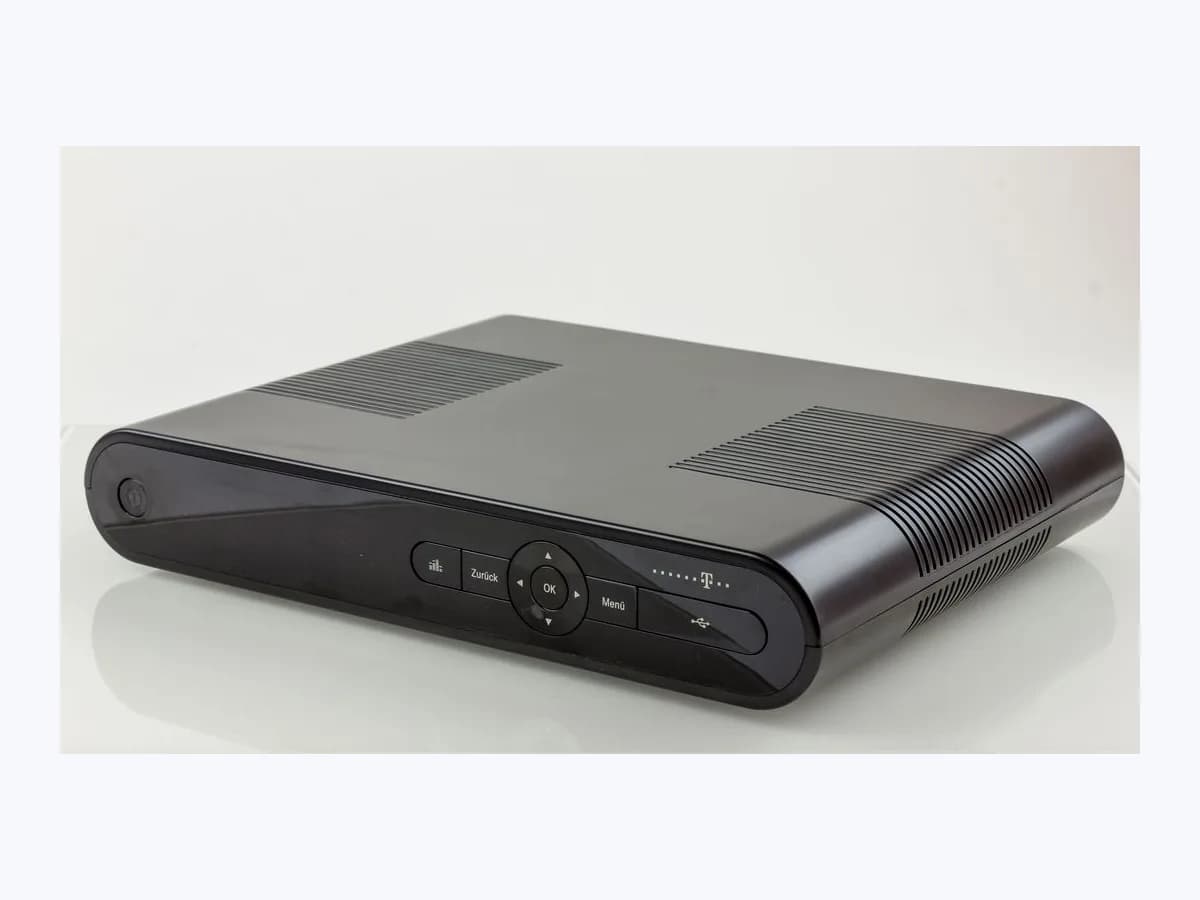
R Luz verde del frontal on TV decoder: green LED no video
Risk level
Low
Usually safe to check without specialist tools.
Urgency
Medium
Quick answer
When R TV shows no picture while the front green light on the decoder is on (“está encendida la luz verde del frontal”), the box is on but video is not reaching the TV. Toggle power with the R remote, pick the right HDMI input, check the HDMI lead and unplug for a couple of minutes.
Safety first
Stop and check this first
- Leave 7 to 10 cm of clear space around the R decoder for ventilation, do not block its vents or place it on soft furniture or carpets, and keep ambient temperature below 35 degrees Celsius and humidity at or below 75%.
- Always unplug the equipment from the 230V AC, 50Hz electrical mains before connecting or disconnecting any cable, use only the power adapter supplied with the decoder, and never open or tamper with the casing: R's manual warns that contact with 230 volts can be fatal or cause severe injury.
Safe checks you can perform
- Turn the decoder off and on with the R remote and check front LEDs
- Select the matching HDMI input source on the television
- Verify that the HDMI and R antenna cables are firmly seated
- Unplug from the mains and wait a couple of minutes without touching anything
Leave these tasks to a qualified professional
- Do not attempt this professional task: Line check and fault ticket with R official support
- Do not attempt this professional task: On-site technician visit for R wall sockets, wiring or decoder swap
What a technician must be able to justify
Technician visit
These are the steps they must carry out and show you. Tick them as they work: if steps are skipped, do not accept a part swap.
These are not instructions for opening or handling the equipment yourself. They are the checks that should support a technical conclusion.
Line check and fault ticket with R official support
What they doIf toggling power with the remote, confirming the TV's HDMI input, checking the HDMI cable and unplugging the box for a couple of minutes still leave the TV without picture, R support checks the line and opens a fault ticket.
They must show youthe status of the TV signal and the decoder's network connection from the operator's test.
In writingthe fault ticket number and the HDMI and reboot checks already completed.
On-site technician visit for R wall sockets, wiring or decoder swap
What they doWhen R television is being installed for the first time or the fault lies in the wall sockets, cabling or the decoder hardware itself, a qualified R technician prepares the outlets or replaces the complete unit.
They must show youthe front indicator lit green, the network LED solid orange, the channel number showing and R TV playing over HDMI.
In writingthe technician's work report and, if the old decoder is removed, its return to R for proper recycling.
Before accepting a part or repair
Nothing has been shown yet. Do not accept a part swap based on the code alone.
Follow these steps
Note: Follow the documented order. An error code identifies the affected system, but it does not prove by itself which part has failed.
Turn the decoder off and on with the R remote and check front LEDs
- Who:
- you, using the R remote control.
- How:
- press the R button on the remote first so it controls the decoder (on the deco 4K remote the orange light illuminates when pressing a key), then switch the decoder off and back on; also check whether the front network light is solid orange and the channel number is displayed.
- Result that matters:
- the decoder refreshes its video output to the television.
- If the picture appears on the TV:
- waking the output from the remote solved it.
- If the front indicator stays green with no TV picture:
- check the HDMI source on your television next.
- Evidence to keep:
- a photo of the R decoder front panel showing the green indicator, network light and channel display.
Evidence: Televisión R: Manual y autoinstalación del desco HD R · Desco R: Guía de instalación del deco 4K de R
Select the matching HDMI input source on the television
- Who:
- you, with the TV remote or the buttons on the television.
- How:
- press the input selector button (source or AV) on your TV repeatedly, or use the matching key on the R remote in TV mode, until the HDMI input connected to the R decoder appears on screen.
- Result that matters:
- the television displays the image and sound coming from the R decoder.
- If switching to the right HDMI input brings back R TV:
- the television was on another source.
- If the screen remains blank on the right HDMI input:
- inspect the HDMI cable connection.
- Evidence to keep:
- a note of which HDMI port on the television is connected to the R decoder.
Evidence: Televisión R: Manual y autoinstalación del desco HD R · Desco R: Guía de instalación del deco 4K de R
Verify that the HDMI and R antenna cables are firmly seated
- Who:
- you, after unplugging the unit from the 230V AC, 50Hz mains as required for safety.
- How:
- with the decoder unplugged from the electrical outlet as R's safety rules require, check that the supplied HDMI cable is firmly connected to both the decoder and the TV, and that the wall cable is tight on RF IN (plus the Ethernet cable to the router on a deco 4K).
- Result that matters:
- securing the physical video and signal links without electrical hazard.
- If restoring mains power brings the picture back:
- an HDMI or RF connector was loose.
- If all connectors are tight but there is still no picture:
- perform the full power restart.
- Evidence to keep:
- a photo of the rear HDMI and RF IN connections on the R decoder.
Evidence: Televisión R: Manual y autoinstalación del desco HD R · Desco R: Guía de instalación del deco 4K de R
Unplug from the mains and wait a couple of minutes without touching anything
- Who:
- you.
- How:
- unplug the R decoder from the wall power socket, wait a couple of minutes and plug it back in using its original power adapter. On the Desco HD, blue lights will snake across the front panel for a few minutes until they turn off and the channel number appears; wait without touching any buttons.
- Result that matters:
- picture and sound return once the multi-minute startup sequence finishes.
- If channels appear after the blue lights finish and the channel number shows:
- the lockup is cleared.
- If no picture appears after waiting through the R reboot:
- contact R's official customer support to log a fault.
- Evidence to keep:
- a note of how long you waited during the reboot and which front lights appeared afterwards.
Evidence: Televisión R: Manual y autoinstalación del desco HD R · Desco R: Guía de instalación del deco 4K de R
Still not solved
If the error persists, stop here. See what the technician must do and show you.
Where this code applies
A code is meaningful only inside the right product and version context.
Primary scope
- System
- TVs
- Brand
- R Cable
- Product type
- TV set-top boxes
Known code variants
- decodificador R luz verde no se ve la tele
- desco R encendido pero no se ve
- Luz verde del frontal
- luz verde desco R sin imagen
- no se ve la tele R y está encendida la luz verde del frontal
- R cable TV box green LED no signal on TV
- R decoder green front light no picture
- R desco green indicator no video
What it means
In R's Desco HD television and self-installation manual (troubleshooting table on page 20 and quick guide on page 15), R explains that the front indicator is green when the decoder is on (red means off), and that everything is ready when the network light is solid orange without blinking and the channel number replaces the time on the display. For the state “no se ve la tele R y está encendida la luz verde del frontal”, the manual prescribes checking the remote, the TV's HDMI input, the HDMI cable and a mains power restart. Other models such as the Android TV deco 4K may differ, and this state alone never proves the decoder is faulty.
Warnings and stop conditions
- Lowsource verified
Leave 7 to 10 cm of clear space around the R decoder for ventilation, do not block its vents or place it on soft furniture or carpets, and keep ambient temperature below 35 degrees Celsius and humidity at or below 75%.
Evidence: Televisión R: Manual y autoinstalación del desco HD R
- Highsource verified
Always unplug the equipment from the 230V AC, 50Hz electrical mains before connecting or disconnecting any cable, use only the power adapter supplied with the decoder, and never open or tamper with the casing: R's manual warns that contact with 230 volts can be fatal or cause severe injury.
Evidence: Televisión R: Manual y autoinstalación del desco HD R · Desco R: Guía de instalación del deco 4K de R
Symptoms and causes
Probable causes · in order
- Television set to a different input than the R decoder's HDMI portCommon
R's troubleshooting table asks you to confirm first, using the TV's source or AV selector button, that the television is tuned to the HDMI input where the R decoder is connected.
Evidence: Televisión R: Manual y autoinstalación del desco HD R · Desco R: Guía de instalación del deco 4K de R
- Loose or non-kit HDMI cable between the R decoder and the TVCommon
R instructs you to check that the HDMI cable (2 m max in the Desco HD kit) is firmly plugged into both the decoder and the TV, and the deco 4K guide warns not to use an old HDMI lead instead of the supplied one.
Evidence: Televisión R: Manual y autoinstalación del desco HD R · Desco R: Guía de instalación del deco 4K de R
- Temporary video lockup or first-install loading (up to 20 minutes)Possible
The Desco HD manual notes that if the picture freezes or previous checks fail, you should unplug the unit from power and wait a couple of minutes, and that first-time setup can take up to 20 minutes to load all channel data.
Evidence: Televisión R: Manual y autoinstalación del desco HD R
- Blinking network indicator or unprepared R wall outlet wiringLess common
If the network connection light stays blinking (configuring) instead of solid orange, or if R TV is being installed for the first time without prepared wall sockets, the cabling or line requires R technical support.
Evidence: Televisión R: Manual y autoinstalación del desco HD R · Desco R: Guía de instalación del deco 4K de R
Virtual technician
Does Luz verde del frontal still appear after these checks?
Answer a few questions to narrow down the likely cause and the safest next action. Guidance only - it never replaces a professional.
Sources and technical references
- 1
Televisión R: Manual y autoinstalación del desco HD R
R · 2026 · official_doc
- 2
Desco R: Guía de instalación del deco 4K de R
R · 2026 · official_doc
- 3
Guía del mando y deco 4K | Mundo R
R · 2026 · official_doc
Was this entry useful?