
- Networks
- Fibre routers
PON-VERDE-INTERMITENTE
Vodafone PON-VERDE-INTERMITENTE on ZTE F6600P: ONT registering
Risk level
Low
Usually safe to check without specialist tools.
Urgency
Medium
Quick answer
On Vodafone's ZTE ZXHN F6600P ONT, a blinking green PON light means GPON registration in progress (slow blink) or a firmware update (fast blink). Do not turn it off during fast blinking; if stuck on slow blink, restart for 1 s and call Vodafone.
Safety first
Stop and check this first
- Do not switch off or unplug the ZXHN F6600P while PON is blinking green fast: the manual states the device is updating.
- Do not hold the Reset button for more than 5 seconds unless Vodafone asks you to: holding it over 5 seconds performs a factory reset, whereas 1 second only reboots.
- Never stare into the PON optical interface to avoid eye injury, and never attempt to open the device casing.
Safe checks you can perform
- Tell slow green blinking apart from fast green blinking
- Check the adjacent LOS indicator at the same time
- Restart with a 1-second press on the side Reset button
Leave these tasks to a qualified professional
- Do not attempt this professional task: Remote GPON registration check with Vodafone
- Do not attempt this professional task: Vodafone technician home visit
What a technician must be able to justify
Technician visit
These are the steps they must carry out and show you. Tick them as they work: if steps are skipped, do not accept a part swap.
These are not instructions for opening or handling the equipment yourself. They are the checks that should support a technical conclusion.
Remote GPON registration check with Vodafone
What they doVodafone technical support checks on their OLT why your ZTE ZXHN F6600P ONT remains stuck in the registration process and does not reach solid green.
They must show youthe GPON registration status of your ONT serial number on Vodafone's network.
In writingthe fault ticket number, the GPON link diagnosis and the configuration action taken.
Vodafone technician home visit
What they doIf remote provisioning cannot complete registration, a Vodafone technician tests optical power at the wall socket and SC/APC PON port and replaces the ONT if needed.
They must show youthe optical power reading within receiver sensitivity and the PON LED lit solid green.
In writingthe measured optical reading, the cause found and whether the ZXHN F6600P unit was replaced.
Before accepting a part or repair
Nothing has been shown yet. Do not accept a part swap based on the code alone.
Follow these steps
Note: Follow the documented order. An error code identifies the affected system, but it does not prove by itself which part has failed.
Tell slow green blinking apart from fast green blinking
- Who:
- you.
- How:
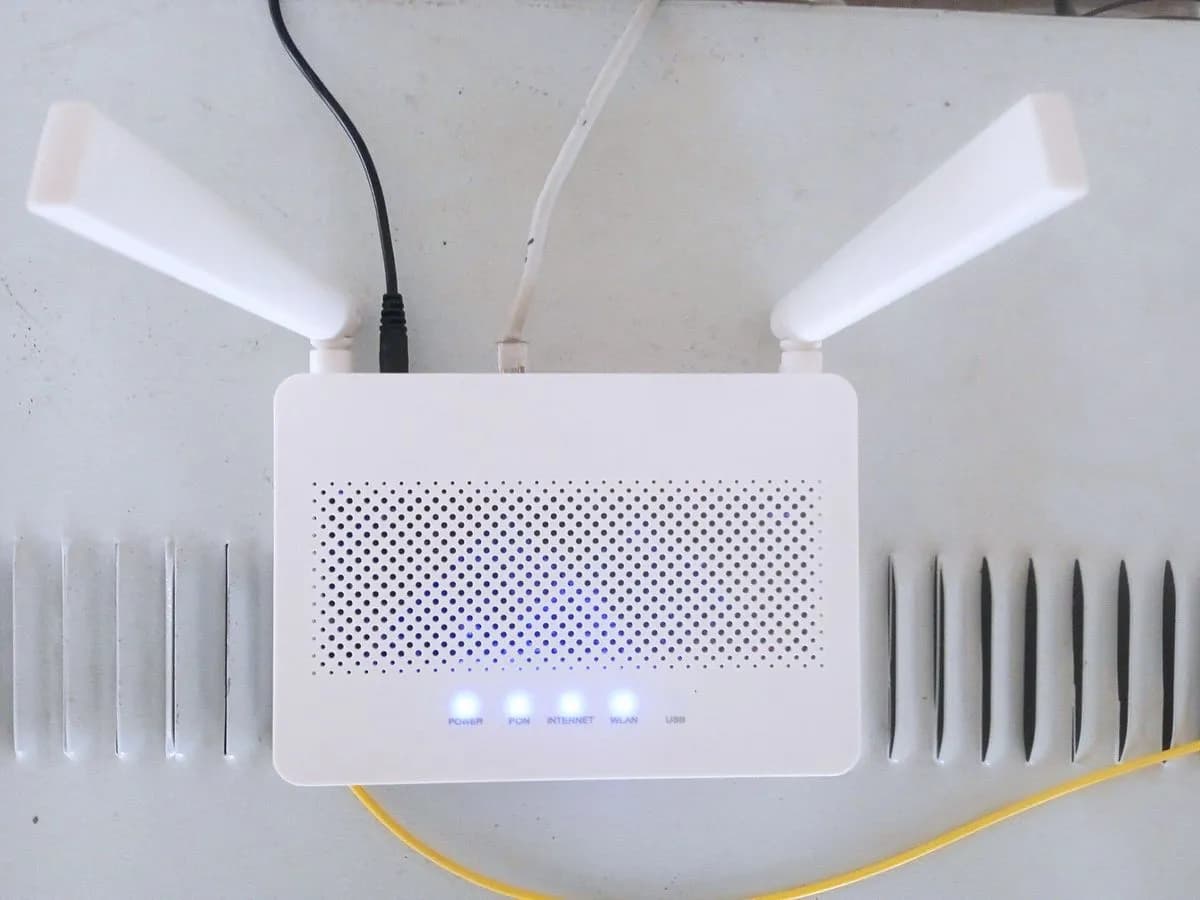
- watch the PON LED on the front panel of the ZXHN F6600P for a few seconds to see whether it blinks green fast (device updating) or slowly (registration in progress).
- Result that matters:
- avoiding powering off the ONT in the middle of a firmware update.
- If it blinks green fast:
- leave the ONT switched on until the update finishes and PON turns solid green.
- If it blinks green slowly for several minutes without turning solid green:
- continue with the next check.
- Evidence to keep:
- short video of the front panel showing the PON blink speed.
Evidence: ZXHN F6600P GPON ONT Manual de Usuario (Vodafone España)
Check the adjacent LOS indicator at the same time
- Who:
- you.
- How:
- look at the LOS light next to PON: off means received optical power is normal, while solid red or blinking red points to an optical transmitter or low optical power issue.
- Result that matters:
- knowing whether the fibre signal reaching the SC/APC PON port is within receiver sensitivity.
- If LOS is off:
- optical power is normal and the delay is in GPON registration.
- If LOS is solid red or blinking red:
- check that the fibre lead is seated without bending it or looking into the port.
- Evidence to keep:
- photo of the front panel showing Power, PON, LOS and Internet LEDs.
Evidence: ZXHN F6600P GPON ONT Manual de Usuario (Vodafone España)
Restart with a 1-second press on the side Reset button
- Who:
- you.
- How:
- only if it is not updating (stuck on slow blink), use a pin to hold the side Reset button for 1 second: the manual states this restarts the unit without losing its current configuration.
- Result that matters:
- retrying GPON registration while keeping all saved settings intact.
- If PON turns solid green and Internet lights up green:
- registration succeeded.
- If PON stays on slow blinking green:
- contact Vodafone technical support.
- Evidence to keep:
- note of the 1-second restart time and the PON light state afterwards.
Evidence: ZXHN F6600P GPON ONT Manual de Usuario (Vodafone España)
Still not solved
If the error persists, stop here. See what the technician must do and show you.
Where this code applies
A code is meaningful only inside the right product and version context.
Primary scope
- System
- Networks
- Brand
- Vodafone
- Product type
- Fibre routers
Known code variants
- ONT Vodafone PON verde intermitente
- Vodafone fibra luz PON parpadea sin internet
- Vodafone fibre PON LED blinking
- Vodafone ONT PON green flashing
- Vodafone ZTE F6600P luz PON verde parpadeando
- Vodafone ZTE F6600P PON light blinking green
- ZXHN F6600P PON fast green blink
- ZXHN F6600P PON parpadeo lento
- ZXHN F6600P PON parpadeo rapido
- ZXHN F6600P PON slow green blink
What it means
In the official ZTE ZXHN F6600P GPON ONT user manual published by Vodafone Spain (in Spanish; other Vodafone router models may differ), Table 4-1 defines two green blink speeds for the PON LED: slow blinking green means the unit is in the registration process on the GPON network, whereas fast blinking green means the device is updating. Once complete, PON stays solid green. This light alone never proves the ONT hardware is faulty.
Warnings and stop conditions
- Mediumeditorial warning
Do not switch off or unplug the ZXHN F6600P while PON is blinking green fast: the manual states the device is updating.
Evidence: ZXHN F6600P GPON ONT Manual de Usuario (Vodafone España)
- Mediumeditorial warning
Do not hold the Reset button for more than 5 seconds unless Vodafone asks you to: holding it over 5 seconds performs a factory reset, whereas 1 second only reboots.
Evidence: ZXHN F6600P GPON ONT Manual de Usuario (Vodafone España)
- Higheditorial warning
Never stare into the PON optical interface to avoid eye injury, and never attempt to open the device casing.
Evidence: ZXHN F6600P GPON ONT Manual de Usuario (Vodafone España)
Symptoms and causes
Probable causes · in order
- GPON registration in progress (slow green blink)Common
When PON blinks green slowly, the manual states that the ZXHN F6600P is currently registering with Vodafone's optical network before turning solid green.
Evidence: ZXHN F6600P GPON ONT Manual de Usuario (Vodafone España)
- Device firmware update running (fast green blink)Possible
When PON blinks green rapidly, the manual specifies that the ZXHN F6600P is updating its software and must be allowed to finish.
Evidence: ZXHN F6600P GPON ONT Manual de Usuario (Vodafone España)
- GPON link or ONT registration blocked on the linePossible
In the troubleshooting section, the manual links an unestablished GPON link or an unregistered ONT to a PON indicator that does not reach solid green.
Evidence: ZXHN F6600P GPON ONT Manual de Usuario (Vodafone España)
Virtual technician
Does PON-VERDE-INTERMITENTE still appear after these checks?
Answer a few questions to narrow down the likely cause and the safest next action. Guidance only - it never replaces a professional.
Sources and technical references
- 1
ZXHN F6600P GPON ONT Manual de Usuario (Vodafone España)
Vodafone España · 2023 · manual
Was this entry useful?