
- Networks
- DSL routers
POWER-DSL-INTERMITENTE
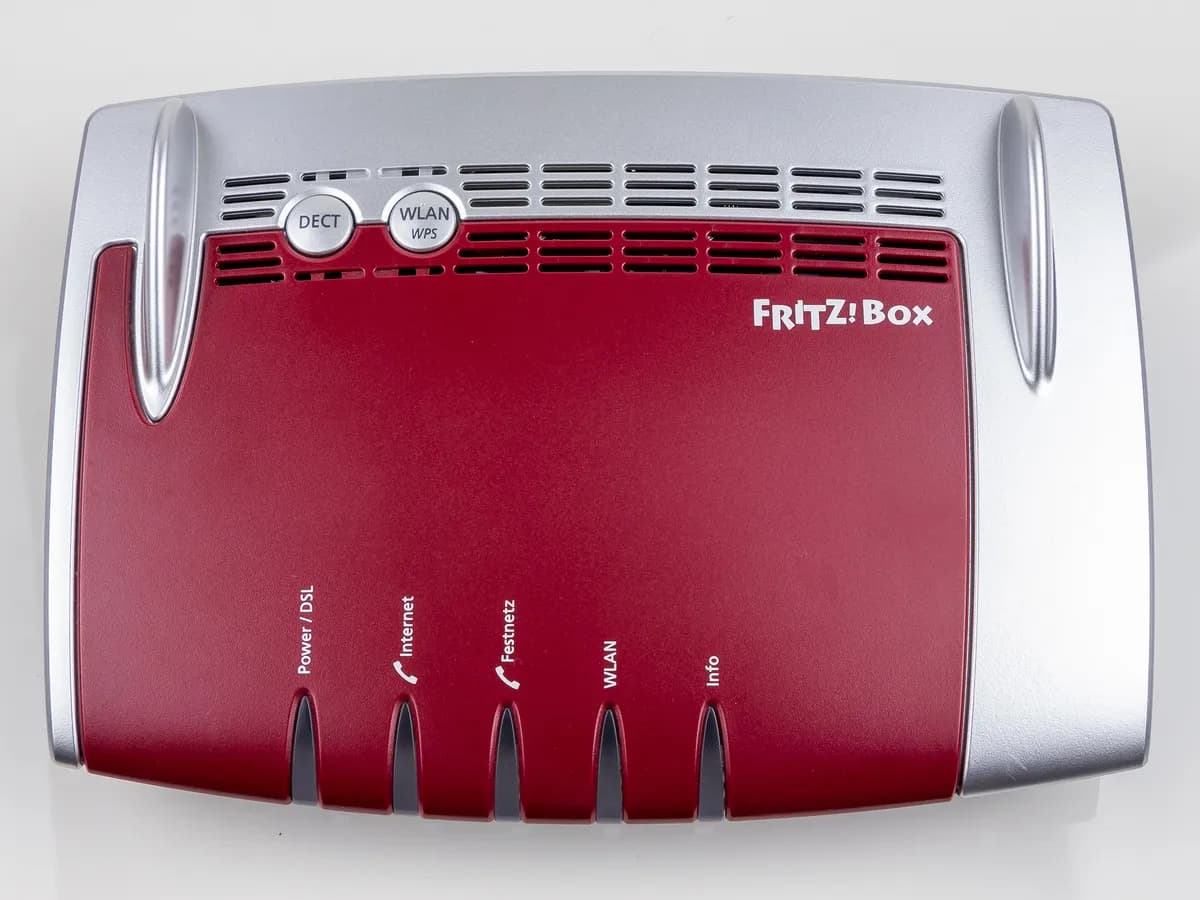
FRITZ!Box Power/DSL LED flashing on 7530: no DSL synchronization
Risk level
Low
Usually safe to check without specialist tools.
Urgency
Medium
Quick answer
If the FRITZ!Box Power/DSL LED is still flashing after 10 minutes, there is no DSL synchronization with the exchange. Check the event log, the DSL cable and the wall socket, and run the DSL line test before calling your provider.
Safety first
Stop and check this first
- Do not open the wall socket or work on the phone line wiring inside the wall: that is a job for the provider's engineer.
- Ask your provider before requesting a line check: FRITZ! warns that the check may be charged.
Safe checks you can perform
- FRITZ!Box event log
- Built-in DSL line test
- Another DSL cable and minimal wiring
- DSL settings: Annex and interference resistance
Leave these tasks to a qualified professional
- Do not attempt this professional task: DSL line check by the provider
- Do not attempt this professional task: Synchronization check after the repair
What a technician must be able to justify
Technician visit
These are the steps they must carry out and show you. Tick them as they work: if steps are skipped, do not accept a part swap.
These are not instructions for opening or handling the equipment yourself. They are the checks that should support a technical conclusion.
DSL line check by the provider
What they doThe provider tests the line from its systems or sends an engineer who checks the copper pair to your socket and synchronization at the exchange.
They must show youthe line test result and where the fault was found.
In writingthe incident number, the fault found, whether it is charged and the date.
Synchronization check after the repair
What they doWith the engineer present or on the phone, connect the FRITZ!Box directly to the wall socket and check that the Power/DSL LED stays lit within 10 minutes.
They must show youthe Power/DSL LED lit and the event log showing DSL available with its speed.
In writingthe repair carried out, the synchronization speed and the date.
Before accepting a part or repair
Nothing has been shown yet. Do not accept a part swap based on the code alone.
Follow these steps
Note: Follow the documented order. An error code identifies the affected system, but it does not prove by itself which part has failed.
FRITZ!Box event log
- Who:
- you, from a computer connected to the FRITZ!Box.
- How:
- in the FRITZ!Box user interface open System, Event Log and the Internet Connection tab; look for the no DSL synchronization message and whether DSL is available with a speed also appears.
- Result that matters:
- whether it never synchronizes or synchronizes and drops from time to time.
- If you only see DSL not responding:
- move on to the cable and the line test.
- If DSL is available with a speed also appears:
- the connection drops intermittently and FRITZ! has a separate guide for frequent drops.
- Evidence to keep:
- screenshot of the event log with date and time.
Evidence: The FRITZ!Box's Power LED flashes (FRITZ!Box 7530)
Built-in DSL line test
- Who:
- you, following the FRITZ!Box's own help pages.
- How:
- under Help and Info, FRITZ!Box Support, open the DSL line test; remove the DSL cable, click Calibrate, plug the cable back in and click Measure.
- Result that matters:
- the test result: defective cable, home wiring fault or provider fault.
- If it reports a defective cable or a wiring fault:
- fix it as described in the next checks.
- If it reports a provider fault:
- test with another modem or another line and call your provider.
- Evidence to keep:
- screenshot of the DSL line test result.
Evidence: The FRITZ!Box's Power LED flashes (FRITZ!Box 7530)
Another DSL cable and minimal wiring
- Who:
- you, without opening the wall socket.
- How:
- connect the FRITZ!Box to the wall socket with a different DSL cable, remove extension leads, unused cables and in-line protectors, and on an IP line remove the splitter; wait 10 minutes.
- Result that matters:
- whether the Power/DSL LED stays lit with the shortest possible wiring.
- If the LED stays lit:
- the old cable or an in-line item was the cause and must be replaced.
- If it still flashes with a new cable and a direct connection:
- check the DSL settings or ask for a line check.
- Evidence to keep:
- photo of the final connection and a note of how long the LED took to stay lit.
Evidence: The FRITZ!Box's Power LED flashes (FRITZ!Box 7530)
DSL settings: Annex and interference resistance
- Who:
- you, from the FRITZ!Box user interface.
- How:
- in Internet, DSL Information, Line Settings tab, show the interference resistance settings; select the Annex your line uses (ask your provider) and click Reset Setting for maximum performance.
- Result that matters:
- ruling out that the FRITZ!Box is set to a different DSL standard from your line.
- If after applying the changes the LED stays lit:
- the setting was the cause.
- If nothing changes:
- FRITZ! suggests testing the current and the previous DSL version and, if it persists, having the line checked.
- Evidence to keep:
- screenshot of the settings before and after the change.
Evidence: The FRITZ!Box's Power LED flashes (FRITZ!Box 7530)
Still not solved
If the error persists, stop here. See what the technician must do and show you.
Where this code applies
A code is meaningful only inside the right product and version context.
Primary scope
- System
- Networks
- Brand
- FRITZ!
- Product type
- DSL routers
Known code variants
- DSL no responde FRITZ!Box
- DSL not responding (no DSL synchronization)
- FRITZ!Box 7530 luz Power parpadea
- FRITZ!Box 7530 Power LED flashes
- FRITZ!Box DSL not connecting
- FRITZ!Box led Power/DSL parpadea
- FRITZ!Box no conecta DSL
- FRITZ!Box no DSL sync
- FRITZ!Box Power/DSL LED flashing
- FRITZ!Box sin sincronización DSL
What it means
In FRITZ!'s official guide for the FRITZ!Box 7530, the Power/DSL LED flashes while the router connects to the DSL exchange, which can take up to 10 minutes, and stays lit once the DSL connection is established. If it keeps flashing, the FRITZ!Box cannot synchronize and the event log shows "DSL not responding (no DSL synchronization)". The cause can be the cable, the home wiring, the DSL settings or the provider's line. Other FRITZ!Box models may differ. No Spanish version of the page could be opened, so both locales follow the official English page.
Warnings and stop conditions
- Mediumeditorial warning
Do not open the wall socket or work on the phone line wiring inside the wall: that is a job for the provider's engineer.
Evidence: The FRITZ!Box's Power LED flashes (FRITZ!Box 7530)
- Lowsource verified
Ask your provider before requesting a line check: FRITZ! warns that the check may be charged.
Evidence: The FRITZ!Box's Power LED flashes (FRITZ!Box 7530)
Symptoms and causes
Probable causes · in order
- Faulty or loose DSL cableCommon
The FRITZ!Box DSL line test can report a defective or unplugged cable; FRITZ! asks you to try a different DSL cable to the wall socket.
Evidence: The FRITZ!Box's Power LED flashes (FRITZ!Box 7530)
- Fault in the home wiringCommon
Extension cables, unused cables, extra sockets, surge protectors or a splitter on an IP line can stop the DSL from synchronizing.
Evidence: The FRITZ!Box's Power LED flashes (FRITZ!Box 7530)
- DSL setting not suited to the linePossible
A wrong Annex setting (outside Germany it is almost always Annex A) or a changed interference resistance can stop the DSL connection being established.
Evidence: The FRITZ!Box's Power LED flashes (FRITZ!Box 7530)
- Fault on the provider's linePossible
If another modem also fails on your line, or the FRITZ!Box connects on a different line, the DSL line itself is faulty and your provider must check it.
Evidence: The FRITZ!Box's Power LED flashes (FRITZ!Box 7530)
Virtual technician
Does POWER-DSL-INTERMITENTE still appear after these checks?
Answer a few questions to narrow down the likely cause and the safest next action. Guidance only - it never replaces a professional.
Sources and technical references
- 1
The FRITZ!Box's Power LED flashes (FRITZ!Box 7530)
FRITZ! (AVM) · 2026 · official_doc
Was this entry useful?